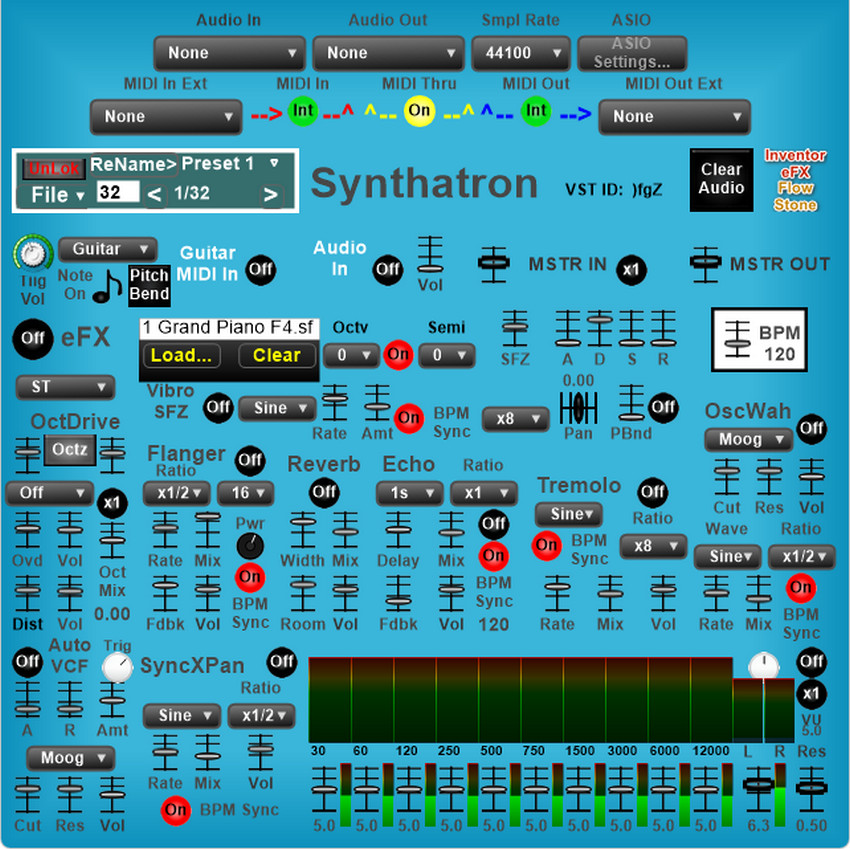
Synthatron Effects Synthesizer
Posted: Mon Jun 29, 2020 12:26 am
Updated: 03/10/25
REPLACE PREVIOUS DOWNLOADS DO NOT OVERWRITE
Synthatron Effects Synthesizer
NOTE: All FSM (Flowstone Schematics) Files are created with Flowstone v3.0.6 'Pebble' including 'standalone executable' effects/instruments for legacy compatibility.
All VST2 and VST3 Plugins (both x86-32bit *.dll & x64-64bit *.vst3) are now exported from FlowStone Alpha x64.
Updated VST & VSTi Plugins are created with new ID's (4-character alpha-symbol-numeric format).
It is advisable to backup the previous version by moving same to a folder (such as "Documents") and replace them with the new ones, rather than overwriting the old versions. This will ensure a 'new vst scan' acceptance in most DAWs (Digital Audio Workstations).
Designed for use with standard electric guitar it can be utilized with practically any form of audio source input.
The audio is first processed through a pitch extractor then converted to a midi mono signal. This allows a standard 'audio stream' to be used to control midi effects. Conversion can cause significant latency. Use of ASIO latency reduction software such as ASIO4ALL is advised.
Synthatron Download Link:
https://www.inventorefx.com/_ifxfstone/synthatron.zip
'Custom Designed' SFZs
Download Link:
https://www.inventorefx.com/_ifxfstone/pwesfzs.zip
View Large Image:
https://www.inventorefx.com/_ifxfstone/ ... ron_lg.jpg
Synthatron utilizes SFZ soundfonts for the SFZ1 VCA/VCF sampler (near top left). It may be necessary to 'load' an instrument soundfont at startup. Open/Load a soundfont fron the "pwemidisfzs" folder included in the zip file. Instrument soundfonts are in the main folder with ".sfz" file extension name.
Example: "1 Grand Piano F4.sfz"
IMPORTANT!
To access folders and/or files in protected directories in newer versions of Microsoft Windows requires Administrator Privileges and it is advisable to set Control Panel (UAC) User Account Control setting at minimum.
NOTE: To make certain downloaded files are functional 'Right Button Click' on the downloaded file and scroll down to 'Properties' and if file is blocked ... unblock the file to make certain it is accessible.
To view 'hidden folders/files' such as AppData ...
Go to Control Panel Items and go to Folder Options ...
'Click On' the middle "View" tab ...
Select the "Show hidden files, folders and drives" radio button ...
Also 'uncheck' the "Hide extensions for known file types" if you desire to view filenames with extension ...
==========
REPLACE PREVIOUS DOWNLOADS DO NOT OVERWRITE
Synthatron Effects Synthesizer
NOTE: All FSM (Flowstone Schematics) Files are created with Flowstone v3.0.6 'Pebble' including 'standalone executable' effects/instruments for legacy compatibility.
All VST2 and VST3 Plugins (both x86-32bit *.dll & x64-64bit *.vst3) are now exported from FlowStone Alpha x64.
Updated VST & VSTi Plugins are created with new ID's (4-character alpha-symbol-numeric format).
It is advisable to backup the previous version by moving same to a folder (such as "Documents") and replace them with the new ones, rather than overwriting the old versions. This will ensure a 'new vst scan' acceptance in most DAWs (Digital Audio Workstations).
Designed for use with standard electric guitar it can be utilized with practically any form of audio source input.
The audio is first processed through a pitch extractor then converted to a midi mono signal. This allows a standard 'audio stream' to be used to control midi effects. Conversion can cause significant latency. Use of ASIO latency reduction software such as ASIO4ALL is advised.
Synthatron Download Link:
https://www.inventorefx.com/_ifxfstone/synthatron.zip
'Custom Designed' SFZs
Download Link:
https://www.inventorefx.com/_ifxfstone/pwesfzs.zip
View Large Image:
https://www.inventorefx.com/_ifxfstone/ ... ron_lg.jpg
Synthatron utilizes SFZ soundfonts for the SFZ1 VCA/VCF sampler (near top left). It may be necessary to 'load' an instrument soundfont at startup. Open/Load a soundfont fron the "pwemidisfzs" folder included in the zip file. Instrument soundfonts are in the main folder with ".sfz" file extension name.
Example: "1 Grand Piano F4.sfz"
IMPORTANT!
To access folders and/or files in protected directories in newer versions of Microsoft Windows requires Administrator Privileges and it is advisable to set Control Panel (UAC) User Account Control setting at minimum.
NOTE: To make certain downloaded files are functional 'Right Button Click' on the downloaded file and scroll down to 'Properties' and if file is blocked ... unblock the file to make certain it is accessible.
To view 'hidden folders/files' such as AppData ...
Go to Control Panel Items and go to Folder Options ...
'Click On' the middle "View" tab ...
Select the "Show hidden files, folders and drives" radio button ...
Also 'uncheck' the "Hide extensions for known file types" if you desire to view filenames with extension ...
==========
 There must be a more optimized version somewhere.