Page 1 of 2
Stereo Limiter
Posted: Mon Jan 20, 2014 4:59 am
by Perfect Human Interface
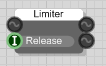
Hi all. I've grabbed this here Limiter module from
the Developers Toolkit on the SM forums. It's simple and it does exactly what I need, with one exception. It has a single stream input/output, but I need it to process in stereo. Now I can run a mono4 through it just fine, but if I'm not mistaken, this will process the left and right signals independently (right?), which is not typical function for a limiter (it can throw off L/R balance). What I'm looking for is for gain reduction on both the left and right signals to be identical, while either the left
or the right signal reaches the threshold.
So, logically, it could take two inputs, compare the two to find which is larger, and then base the gain reduction for both signals off of the larger value signal.
The problem is, I don't know the first thing about assembly code. It's completely foreign to me. So I guess this just amounts to a typical beg for help.

Can anyone help out with stereoizing this baby?
- Limiter.PNG (2.68 KiB) Viewed 37155 times
Also, at what point should I feel bad for using everyone else's work in my work?
Re: Stereo Limiter
Posted: Mon Jan 20, 2014 2:36 pm
by KG_is_back
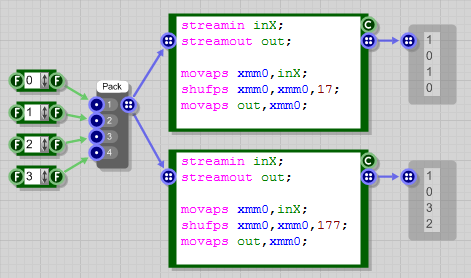
I can't get my hands on the limiter you are talking about, but try this one. It has zero attack time and adjustable release time. It treats mono4 as two stereo pairs (0-1 and 2-3) so it should do what you are looking for. If you need adjustable Threshold then replace
with
Re: Stereo Limiter
Posted: Mon Jan 20, 2014 8:03 pm
by martinvicanek
KG_is_back wrote:It treats mono4 as two stereo pairs (0-1 and 2-3)
In that case, should the third parameter of the shufps instruction not be 177 rather than 17?
- shufps.png (24.92 KiB) Viewed 37126 times
Re: Stereo Limiter
Posted: Mon Jan 20, 2014 10:09 pm
by KG_is_back
martinvicanek wrote:KG_is_back wrote:It treats mono4 as two stereo pairs (0-1 and 2-3)
In that case, should the third parameter of the shufps instruction not be 177 rather than 17?
shufps.png
Yes

you are right. A stupid mistake I've made.
Re: Stereo Limiter
Posted: Mon Jan 20, 2014 10:48 pm
by Perfect Human Interface
Thank you very much, I'll give this a try.
Is assembler difficult to learn or is it pretty straightforward?
Re: Stereo Limiter
Posted: Tue Jan 21, 2014 11:03 pm
by Perfect Human Interface
Hey, so I've put it through the rounds and it does process both signals, though I notice the reduction isn't identical between left and right channels. For example I measure that the left channel is being reduced 12dB or more while the (lower) right channel is reduced by about 8dB. Is that correct functionality?
Also, the limiter I was using had a "Gain Reduction" output. Would it be possible to add that?
I'm uploading the original limiter module mentioned here; I think that will be okay.
(You're on the IOU list KG.)
Re: Stereo Limiter
Posted: Wed Jan 29, 2014 12:41 pm
by alex111
if we change the ports then what will be solution of this stereo limiter?????????????
Re: Stereo Limiter
Posted: Wed Jan 29, 2014 1:59 pm
by KG_is_back
I have adjusted both so they work stereo and output the GR. they give the same result though.
Re: Stereo Limiter
Posted: Sat Feb 01, 2014 9:59 pm
by Perfect Human Interface
Much thanks! I can see that the gain reduction readouts are identical. However I still measure a slight difference on my peak meters. For example a louder left channel is reduced around 10 dB while the right channel is reduced around 6. That's what my meters seem to show. I'm curious as to why this is, but this should be good enough for my purposes regardless.
Re: Stereo Limiter
Posted: Sat Feb 01, 2014 10:34 pm
by KG_is_back
Perfect Human Interface wrote:Much thanks! I can see that the gain reduction readouts are identical. However I still measure a slight difference on my peak meters. For example a louder left channel is reduced around 10 dB while the right channel is reduced around 6. That's what my meters seem to show. I'm curious as to why this is, but this should be good enough for my purposes regardless.
Then there must be something wrong with your readout. Both inputs are multiplied by the same GR so they both should be reduced by the same dB. How do you actually measure the GR?