Page 1 of 1
Sub-Selecetion Designer
Posted: Fri Jan 25, 2013 11:44 am
by chackl
I made a Sub-Select designer
Well i'm using Synthmaker/Flowstone since some time .... and i just found out that this is possible

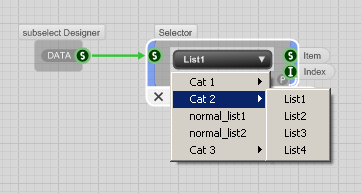
- category_sel.PNG (10.69 KiB) Viewed 20621 times
So i just made a little designer example for it

Regards
Re: Sub-Selecetion Designer
Posted: Fri Jan 25, 2013 2:28 pm
by tester
Thanks, I was just trying to recall from the past - how it was made, because need to reorganize some menus into subsections.
Re: Sub-Selecetion Designer
Posted: Fri Jan 25, 2013 8:05 pm
by chackl
tester wrote:Thanks, I was just trying to recall from the past - how it was made, because need to reorganize some menus into subsections.
It is done like this
Cat 1,>>,List 1,List 2,<<,Cat 2,List 1,List2,>>,Normal List1,Normal List2
So:
>> Go into Subselection
<< Leave Subselection
Regards
Re: Sub-Selecetion Designer
Posted: Fri Jan 25, 2013 9:11 pm
by tester
I know, I know, it was just about year ago, when I last time saw it.
If you don't use things, it's difficult to remember them.
Re: Sub-Selecetion Designer
Posted: Sun Feb 03, 2013 3:49 pm
by philton
you can also save some space in dropdown menus when using "interactive" lists.
here is a simple example. if MIDI Learn is off, the menu will only show the option"activate learn" .
when learn mode is active, the menu will only show "deactivate Learn".
with this method you can easily manage submenus with more than 1 possible item "checked".